
AKTUELL:
Gaiakombas neustes Klangkonzert „Im Frieden schwingen“ ab 4.4.2026 auf Youtube:
ABSCHIEDE
Unser Winter-Kerzenlicht-Konzert am 13.12.25
konnte nicht stattfinden.
Kristin Baege, geliebte Partnerin, Freundin und Kollegin ist am 28. September in die Anderswelt gegangen. Unsere Trauer und der Verlust um sie sind groß.
Kristin war eine wundervolle Wortkünstlerin und hat uns alle mit ihren tiefen, berührenden, wachrüttelnden und auch humorvollen Gedichten begleitet und bereichert.
Voller Dankbarkeit erinnern wir uns an viele erfüllende Trio-Kerzenlichtkonzerte in der Winterzeit von 2008 – 2024 im KlangRaum der Alten Mühle Mössingen.
In Gedenken an Kristin hier eines ihrer Gedichte:
Einmal werden wir den Weg zurückgehen
und all die Stationen von der anderen Seite sehen
und in anderem Licht
und wir werden an das Tor kommen
auf dem geschrieben steht:
Es war gut so
Und noch eine liebe Kollegin und Freundin ist Ende September in den unsichtbaren Raum hinüber gegangen: Ziriah Voigt.
Uns hat eine langjährige Freundschaft und Zusammenarbeit verbunden, aus der auch das gemeinsame Werk „Von Raum zu Raum“ entstanden ist. Danke, Ziriah, für all dein Sein und Wirken!
Mehr über Ziriahs Werk und Wirken: https://padlet.com/hbittner/ziriah-voigt-schwarze-hecke-etdlbzh7epn6
Buch + CD „Von Raum zu Raum“ in Tanz und Lied
zu bestellen über meinen Shop.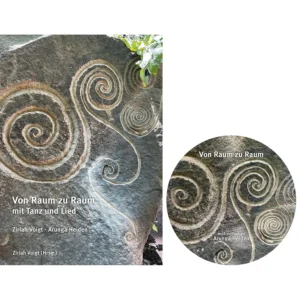
wird demnächst fertig und zum Download bereit gestellt.
Mitwirkung bei der Göttinnenkonferenz 2026 in Blaubeuren
Nähere Infos und Anmeldung unter: https://www.goettinnen-konferenz.de/
Unser Rat der Großmütter hat eine neue, sehr lebendige Homepage. Es lohnt sich zu stöbern.
https://ratdergrossmuetter.de/
Eine Auswahl von Liedern auf einem meiner YOUTUBEKANÄLE:
Wir leben unsere Vision https://youtu.be/Hms0AIIWpuY
Alles hat seine Zeit https://youtu.be/kZZjarTCWZQ?si=IdJ7z20_EStz_zSf
Ein Stern https://youtu.be/gGl9NdtwcLY?si=EnqCBWmzLeai0Bh0
Das Leben ist ein Geschenk https://youtu.be/zGQCsYhLxlU?si=-XLTauQITtWJF8n4
Lasst uns Gräben überwinden https://youtu.be/23732eADnlk
Da wo wir herkommen https://youtu.be/BnUBN7detBQ
Ich freue mich übrigens sehr, wenn ihr meinen Youtubekanal aboniert! Danke!
Neuere CD- oder Buch- Produktionen:
CD+Büchlein „Frieden“ – Klänge und Gesänge für den Frieden von Iria und mir.
Verkauf im Shop 
Das Lieder -und Tanzheft zur CD FRIEDEN Ihr könnt das Büchlein mit Noten und Tanzbeschreibungen ab sofort bestellen. Es kostet 10 Euro oder als Paket mit der CD 25 Euro (statt 28 Euro).
Leider ist im Büchlein beim Lied „Träumerin“ die Melodiestimme in ein paar Takten verloren gegangen. Daher hier zum Download die richtige Version:
Korrekturseite Träumerin